A programmable computer
CS-A1120 Programming 2
Lukas Ahrenberg
Department of Computer Science
Aalto University
(Based on material by Petteri Kaski and Tommi Junttila)
After this round, you
- can explain the principle architecture stored-program computers and automatic execution
- have familiarity with the role of assembly languages
- can implement simple algorithms in the course's
armletassembly language - are aware of computational universality
Feedback repetition quiz
Consider the following sequential logic circuit:
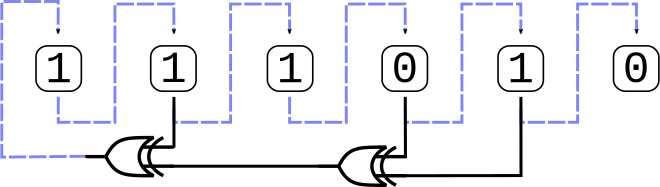
where  denotes the operation XOR (exclusive or).
111010.
What are the updated bit values (as read left to right) after the circuit has been clocked one time, that is at \(t = 1\)?

A programmable machine, this far
Binary representation of data (here, an 8 bit bus)
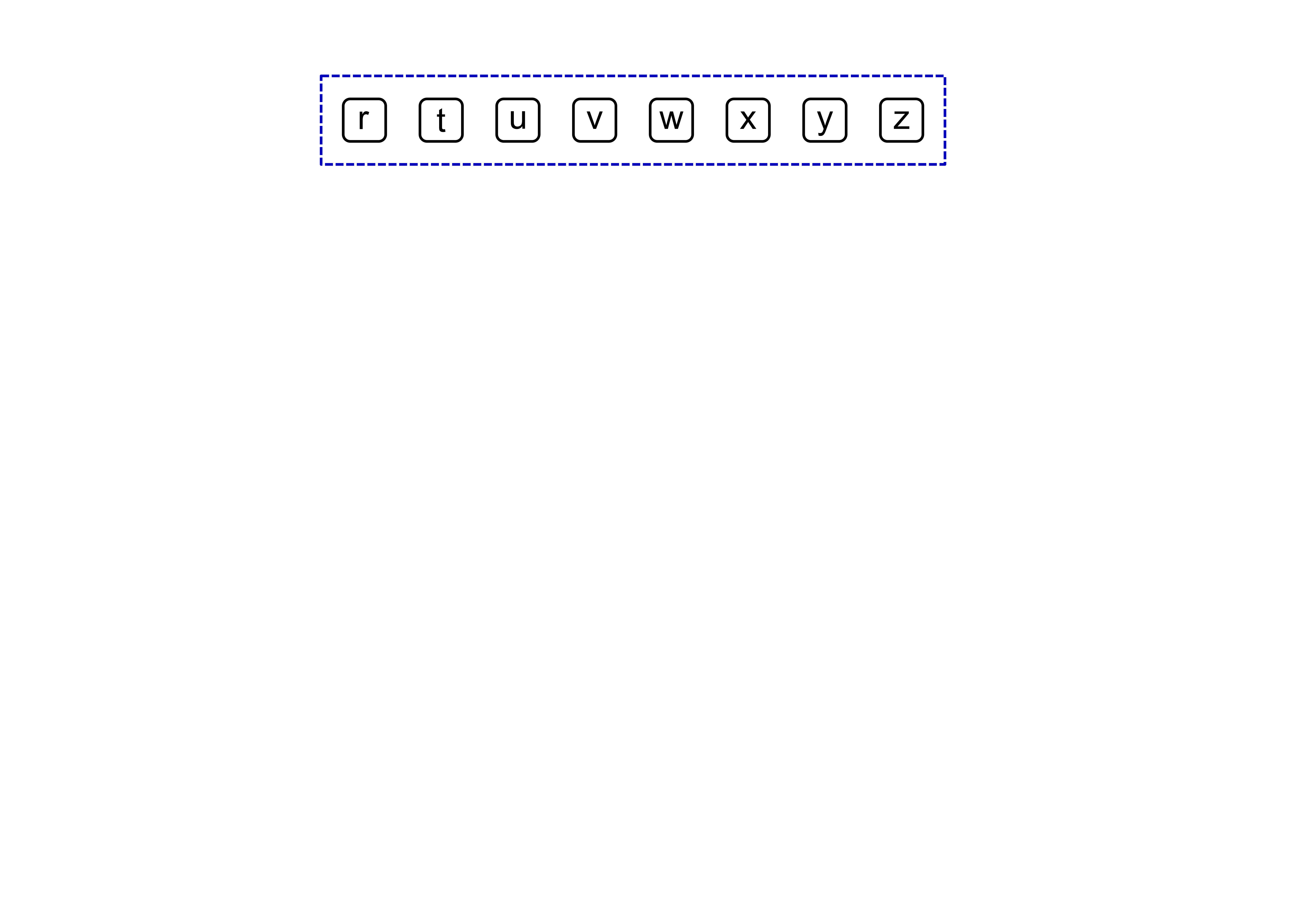
A programmable machine, this far
Combinational logic
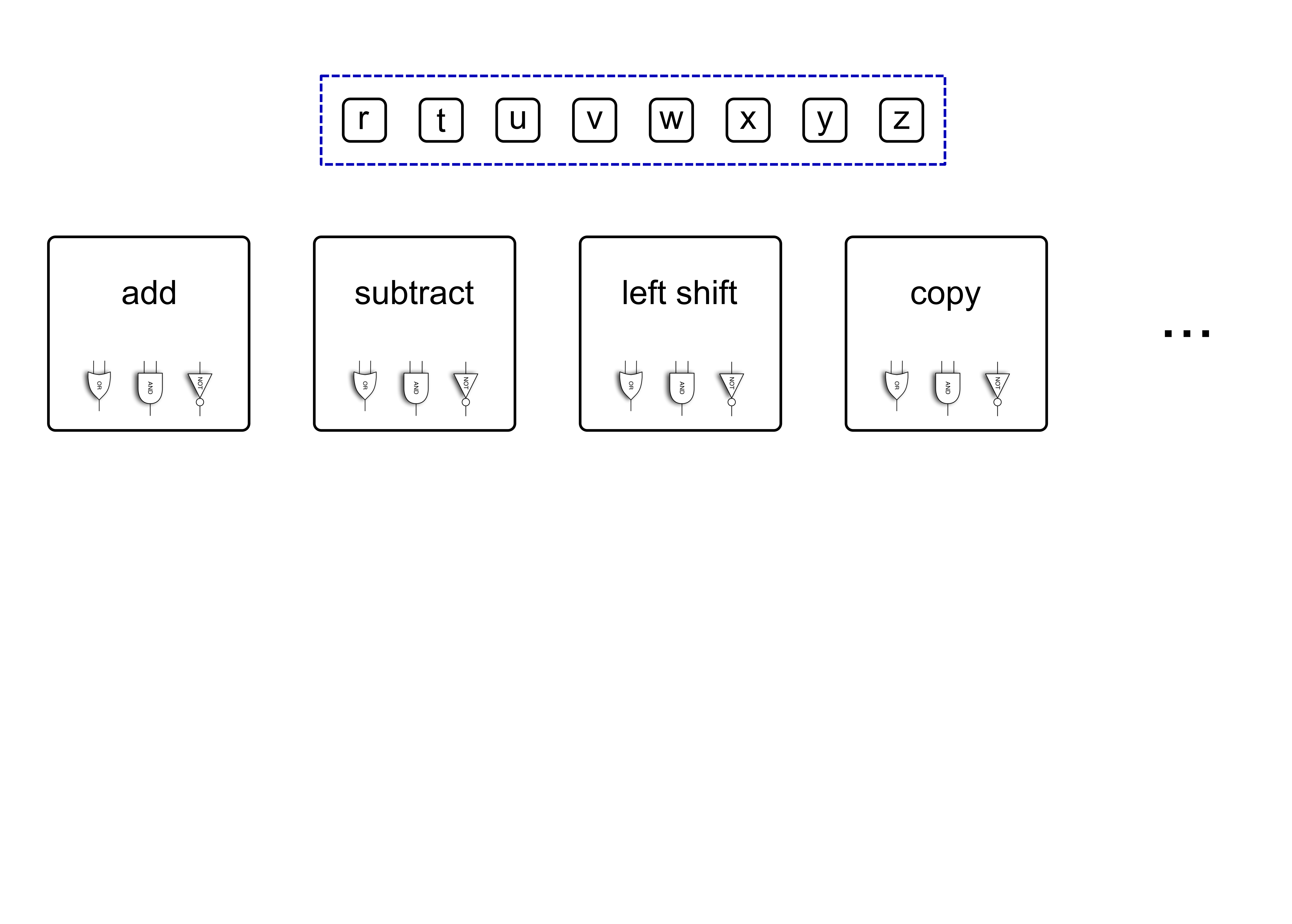
A programmable machine, this far
Combinational logic
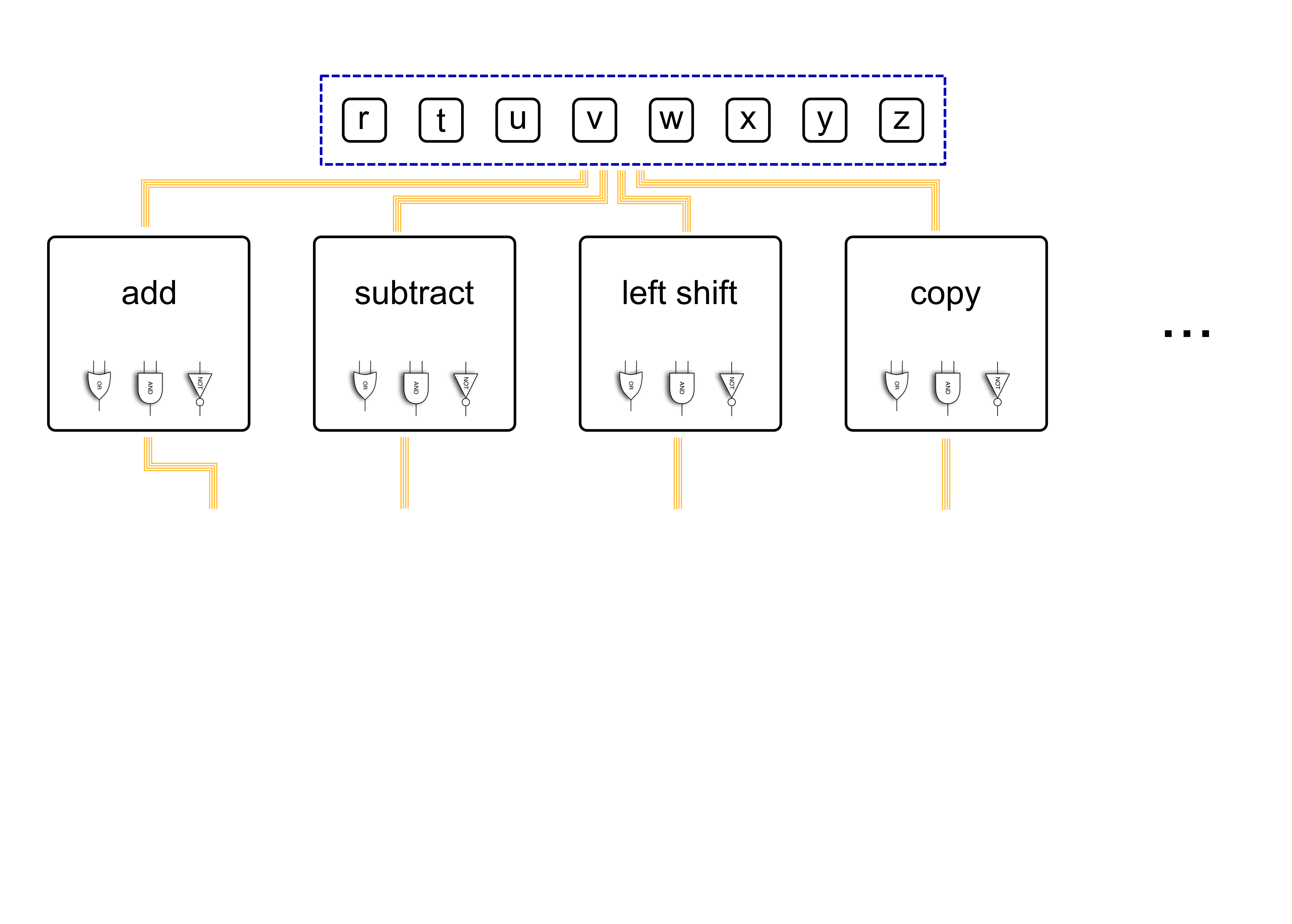
A programmable machine, this far
Combinational logic
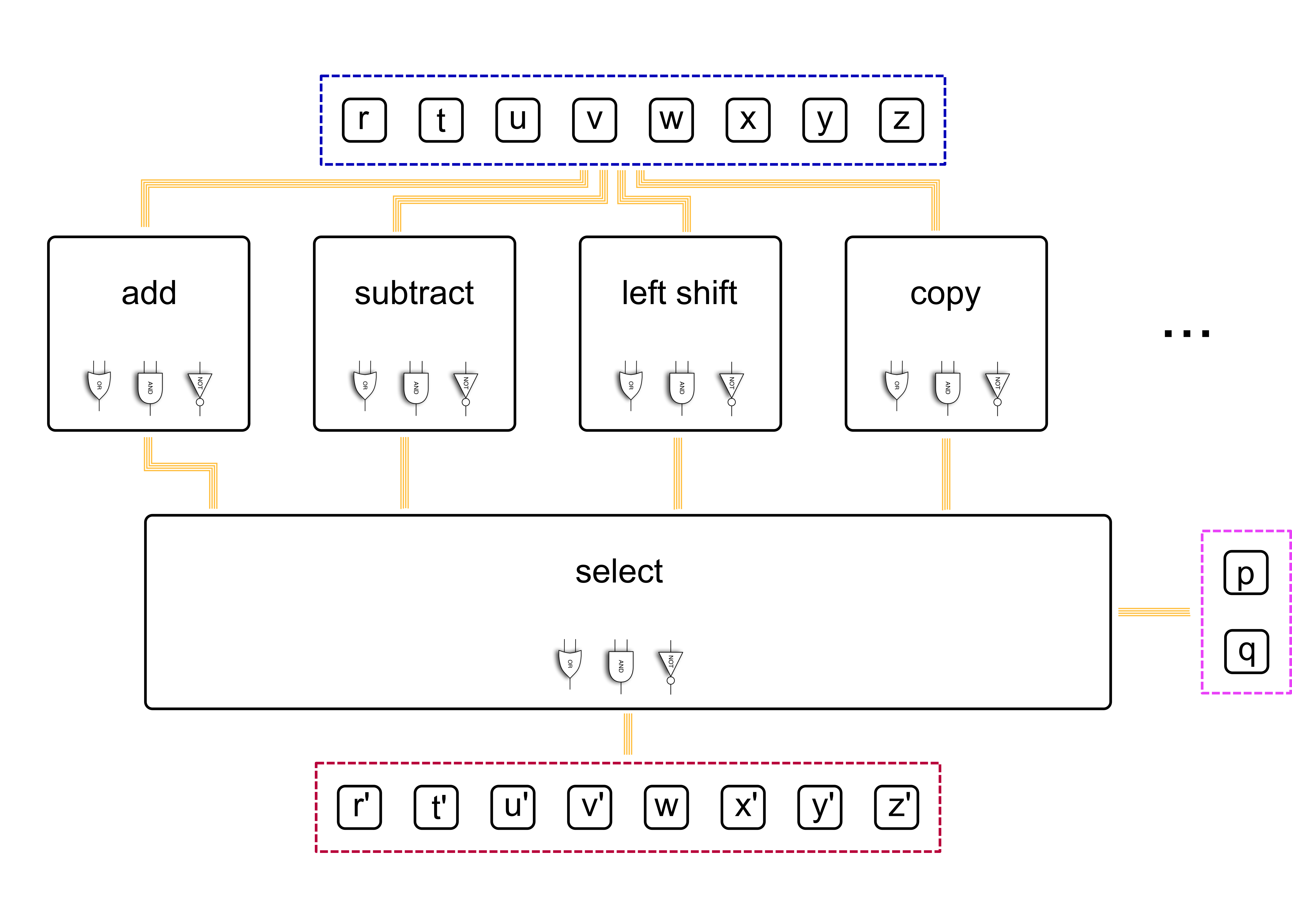
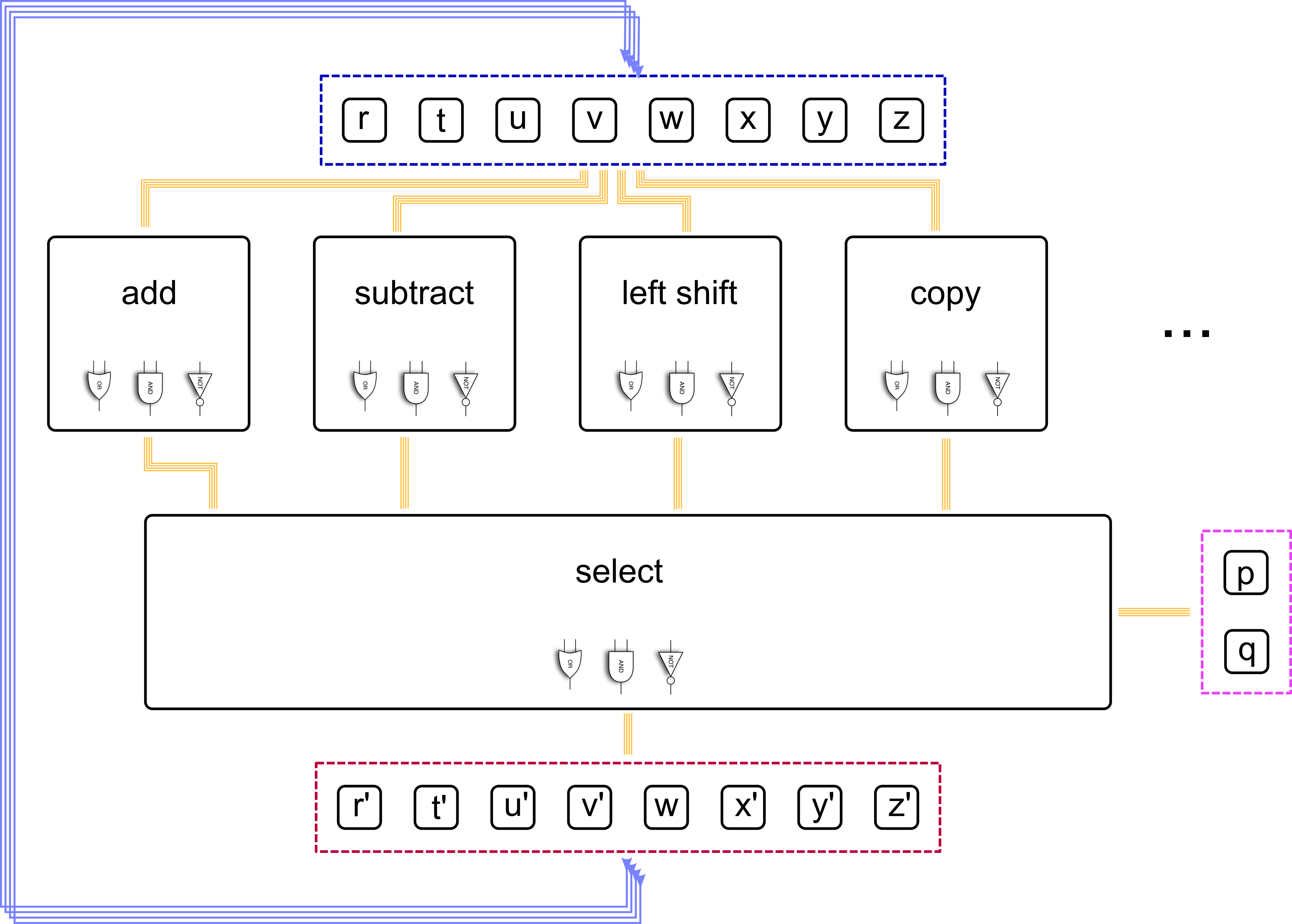
A programmable machine, this far
Sequential logic, for state
Arithmetic Logic Unit (ALU)
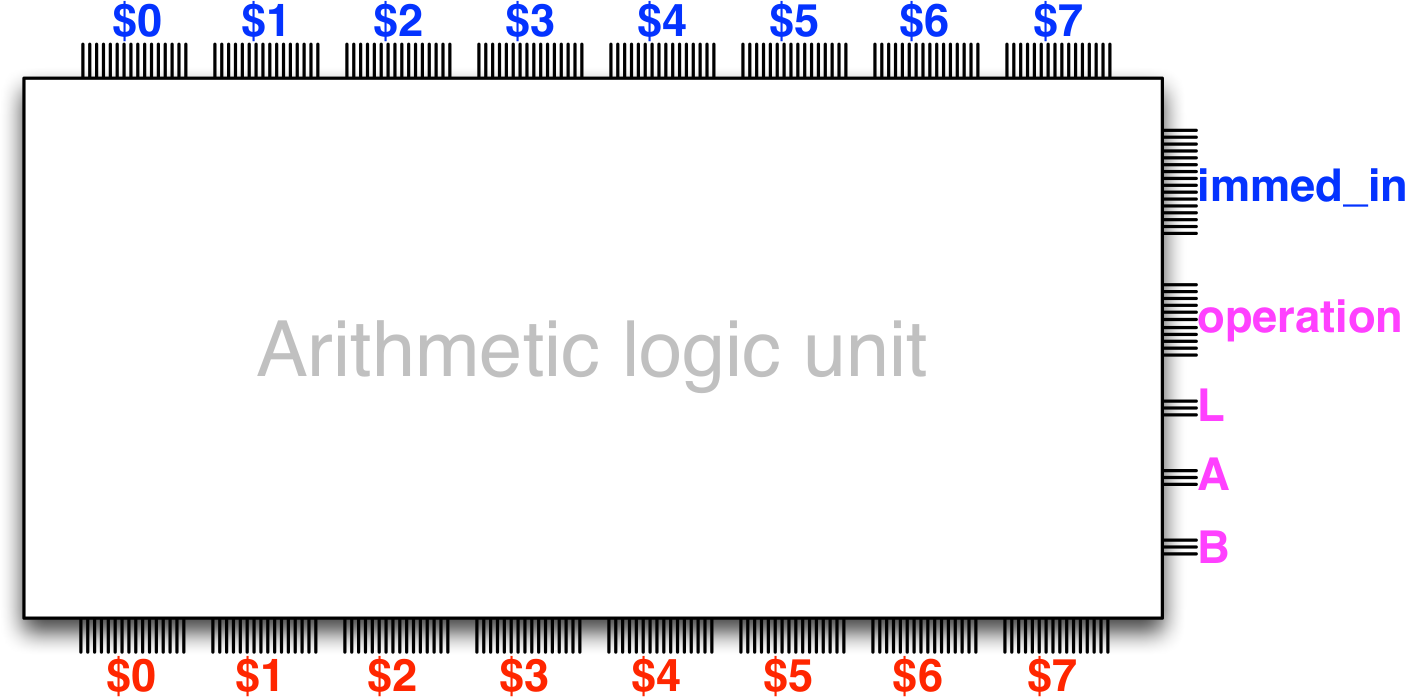
Takes care of calculations and logic in a computer processor
The Armlet Architecture ALU
ALU = Arithmetic Logic Unit
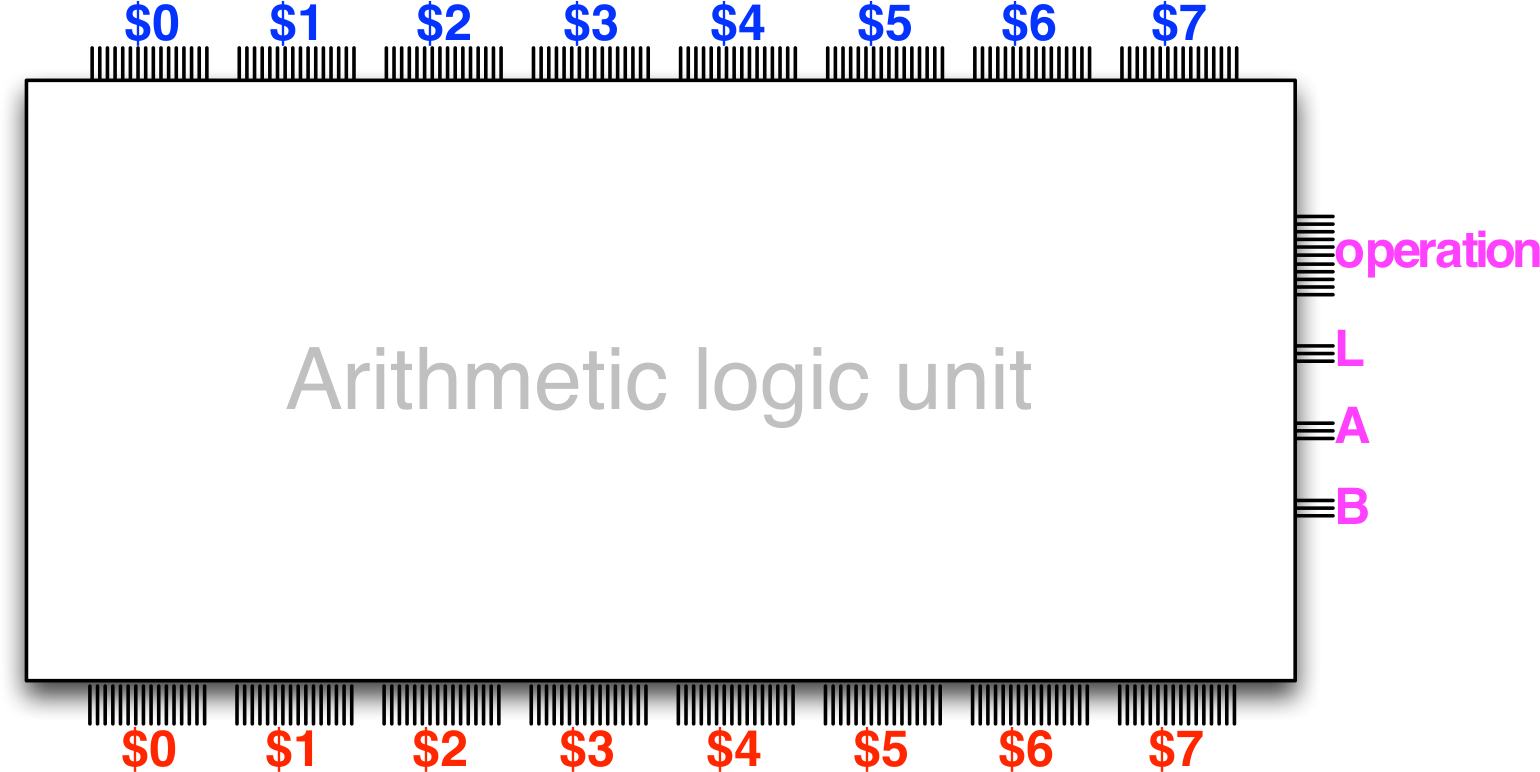
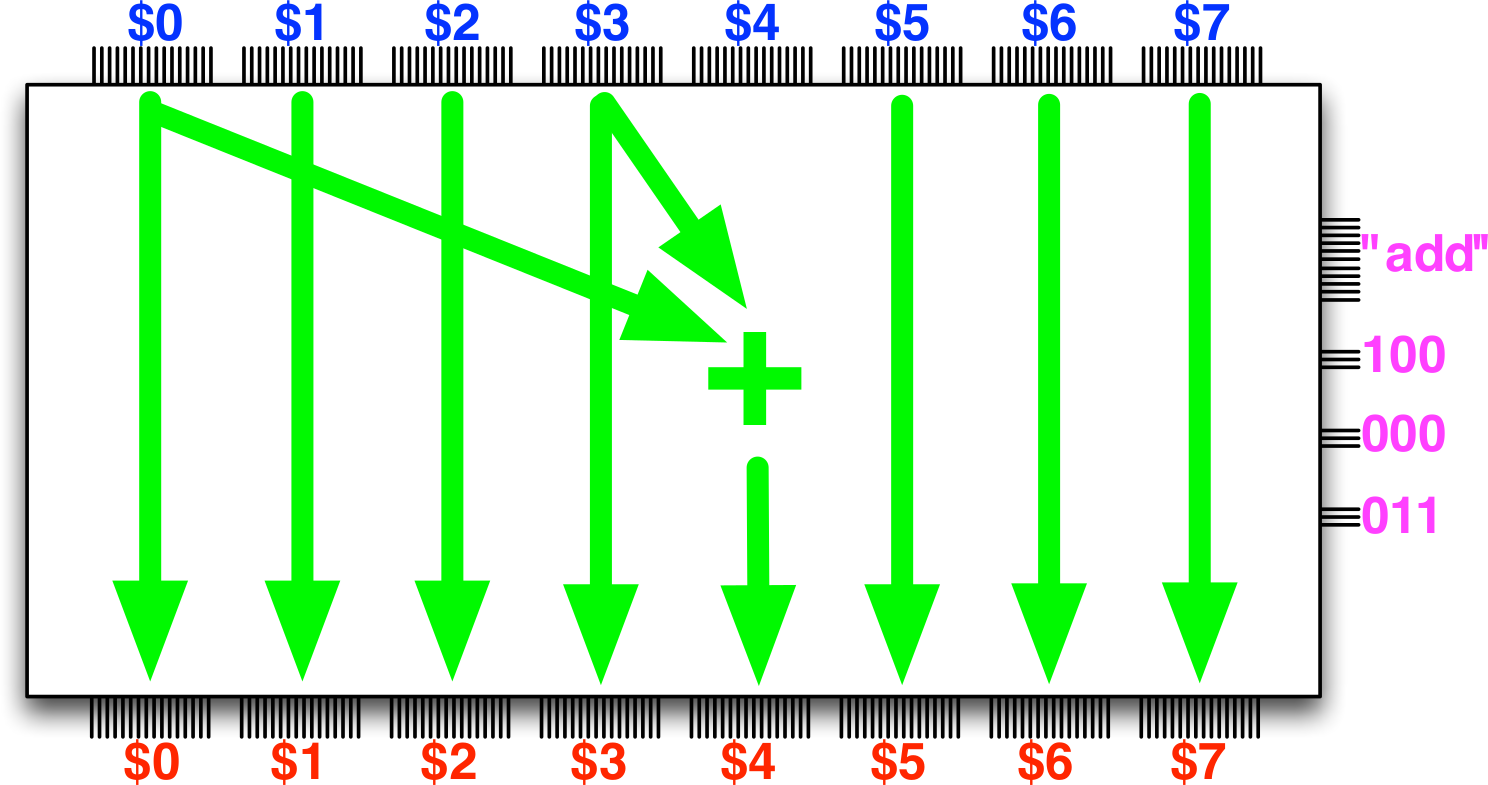
$0…$7are registers, internal stateimmed_inallows data inputoperationencodes which operation to performL,A,Bare destination (L) and source registers (A,B)
This far: memory
Sequential logic also allows us to retain state, and build a memory
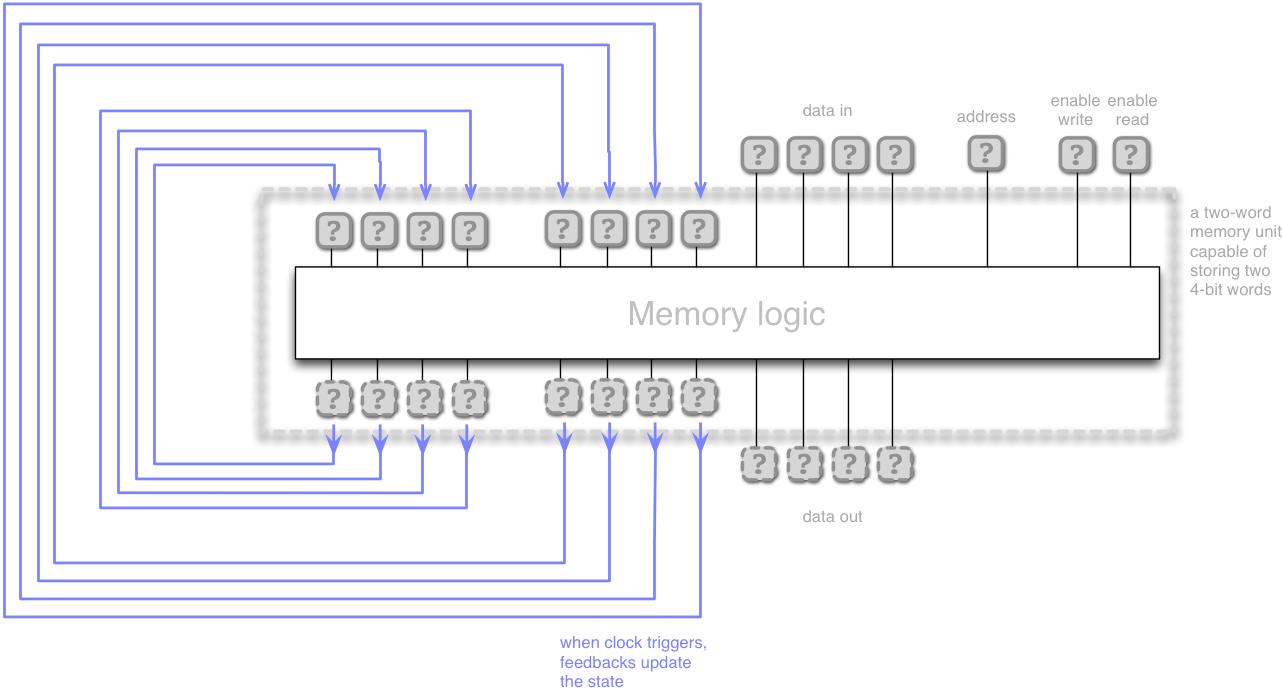
Internally, each memory word retains its state (e.g. using feedback) until it is updated by a write)
This far: memory
A memory module is circuit of multiple one-word memories that can be addressed (indexed)
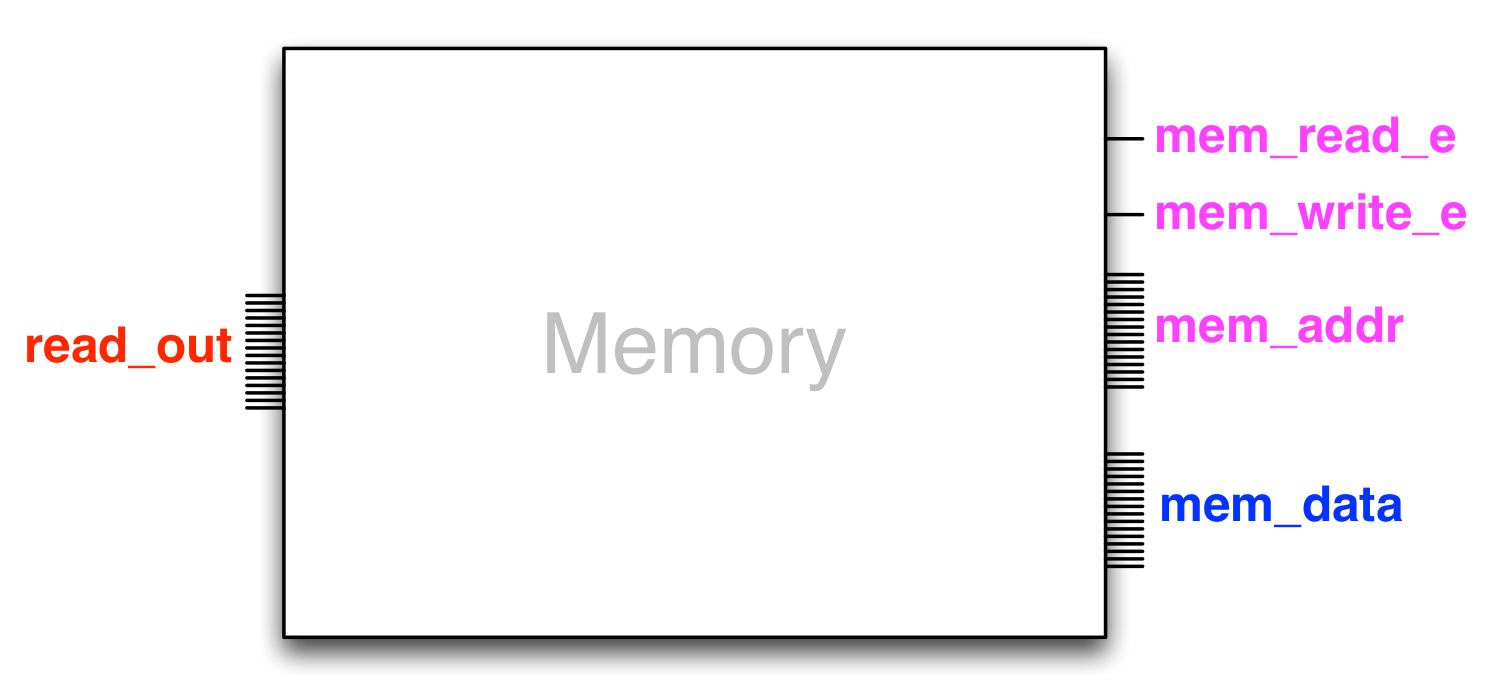
mem_addris the memory address bus- Gates
mem_read_eandmem_write_econtrol reading/writing on that address mem_dataandread_outare the input/output buses- The width (number of gates/bits) of the memory address bus and the word-size of the i/o buses ultimately determines memory capacity
- A memory with
mem_addrsize \(n\) can hold \(2^n\) words of data
This far: The clock
- The clock triggers feedback in a circuit at regular intervals
- Today's processors operating on the GHz scale
- Like a heartbeat driving the sequential circuit logic
This far: The clock (and the counter)
What would a program for the ALU be?
- A sequence of inputs to
operation,L,A,B(total 16 bits = one word), and if neededimmed_in(16 bits) - How could this be stored?
- I could have it written down on a sheet of paper
- Then flick switches corresponding to the bits of the input registers (or plug cables)
- Then clock the ALU and repeat for the next instruction
Boooring (and slow) - let's get the machine to automatically read the next instruction
Let's put programs in memory!
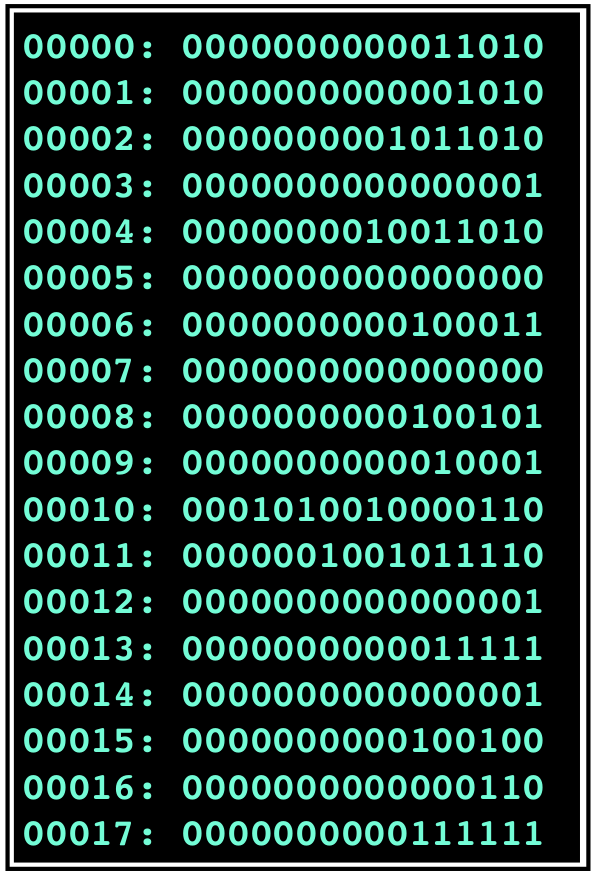
- A program is a sequence of instructions (bits) in the memory
- A program counter contains the address of the current instruction
- Each tick the instruction is loaded from memory to the ALU
- The machine executes the program automatically, one instruction at a time
- Machine code
Armlet – Control & execution unit
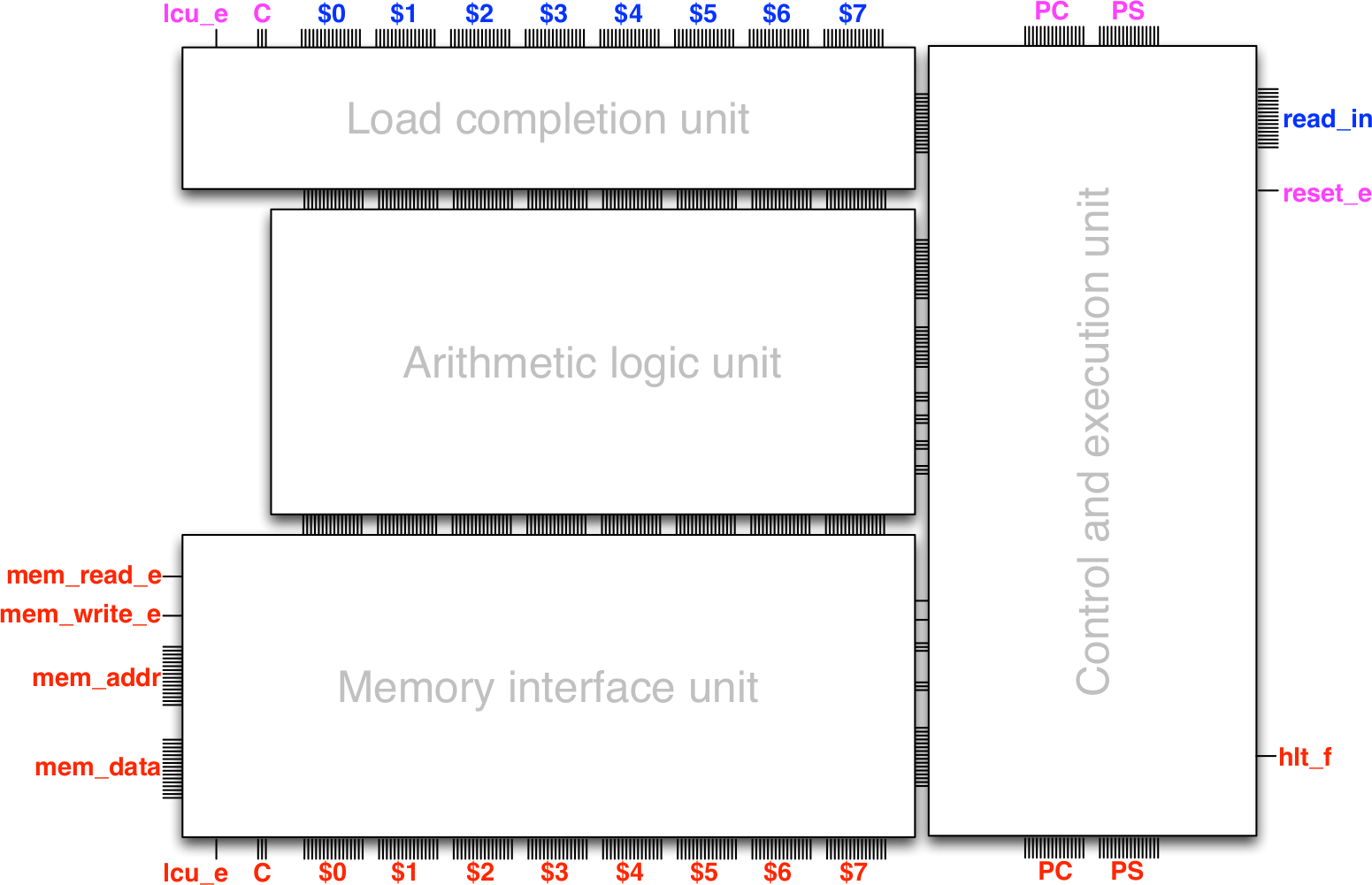
- The Program Counter (PC)
- A special register which tells from which memory address to load the instruction
- By default, PCt+1 = PCt + 1 (That is, fetch word from next memory location.)
- But, the default order can be changed by the instructions themselves
- jump : PCt+1 = <address>
- branch PCt+1 = <address> if some condition holds, else PCt + 1
Conditional branching
- Because a (basic) processor does one operation at a time, we also include a
- Processor Status (PS) register
- A special register; it value reflects the status of previous operations
- For example comparison operations
Armlet – Control & execution unit
(Armlet is an example of a von Neumann architecture)
Briefly: Halting and Trapping
(How does the processor know when to stop executing?)
- Special instruction to halt execution (without the possibility of continuing)
- Instruction to trap execution - breaking execution temporarily (useful for debugging)
Programming
In principle, we can program a computer by setting bits in memory corresponding to the instructions we want the processor to execute
- Inputs are bits → all instructions (and data) are numbers: Machine Code
- First computers were programmed by inputting these numbers directly
- Very hard for a person to follow
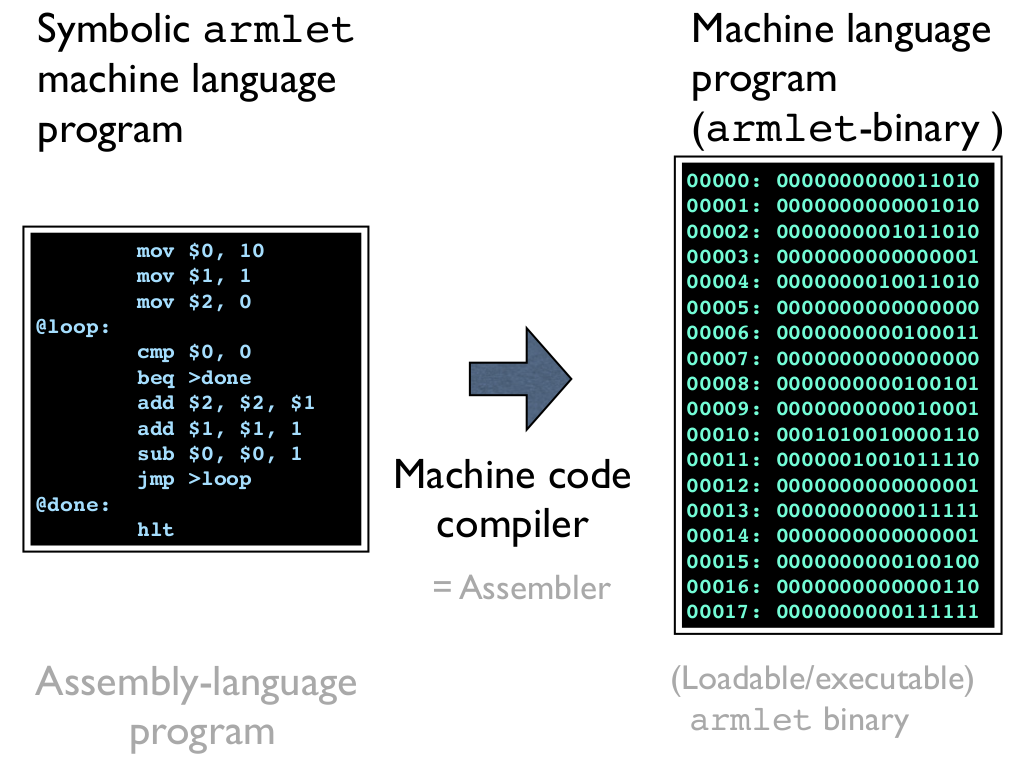
- Assembly language is a one-to-one translation of the instructions into a more human-readable form
- Processor architecture families has their own assembly dialect
- First assembly language written by Kathleen Booth
| Armlet Machine code(s) | Armlet assembly | High-level language |
0111000010000111 |
sub $2, $0, $7 |
r2 = r0 - r7 |
0000001011011100 0011000000111001 |
ior $3, $1, 12345 |
r3 = r1 | 12345 |
The machine code compiler (assembler)
The Mystery of the Computer
Solved?
- Yes, in a sense,
- We can (conceptually) build a programmable machine
- if we can implement the building blocks of sequential logic
- This can be done in hardware
- Then a program is a sequence of binary instructions for this architecture
- Humans usually like to program in text, so we can translate (compile) program code to machine code
- Armlet is a simulated 16 bit architecture built in Scala, using constructions like those used in previous exercises
- Note - armlet is simulated by a model of hardware in software on a computer…
Universality
A programmable machine can, with right programming, simulate another programmable machine
- Computing and programming are concepts which are independent of the device and the programming language
- Emulators
- Virtualization
- Containers
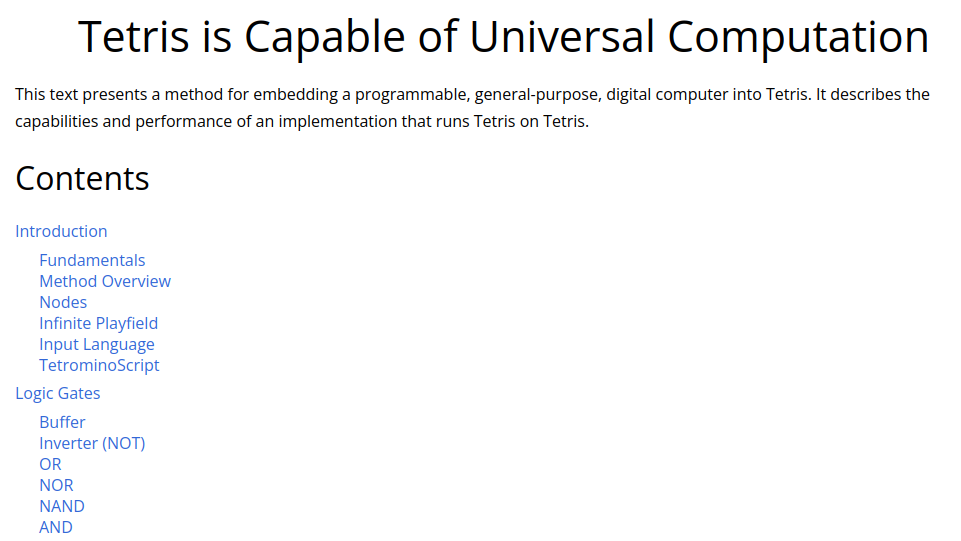
- But, computers can also be built in other systems as long as these have power equivalent to sequential logic…
Conceptually (on armlet):
- Eight
var's (the registers) and one huge array (the memory) - Arithmetic and logic operations, as well as control logic
- Operations that the processor can do in one tick
We will program Assembly – Comment your code!
Always, do it but especially in this round!
- For your own sake
- Assembly language is hard to read, even for the person who wrote it just minutes ago
- For your fellow students and the sanity of course TAs
- TAs will tell you to comment the code before they help you (I've instructed them to)
Our first armlet program
var t = 10
var i = 1
var s = 0

while t != 0 do
  s = s + i
  i = i + 1
  t = t - 1
// Now the sum is in 's'
        mov $0, 10      # $0 = 10
        mov $1, 1       # $1 = 1
        mov $2, 0       # $2 = 0
@loop:                  # This is a label
        cmp $0, 0       # $0 == 0 ? (PS)
        beq >done       # if PS is eq
        add $2, $2, $1  # $2 = $2 + $1
        add $1, $1, 1   # $1 = $1 + 1
        sub $0, $0, 1   # $0 = $0 - 1
        jmp >loop       # Jump back
@done:                  # Another label
        hlt             # Stop, sum in $2
Data Path Instruction set
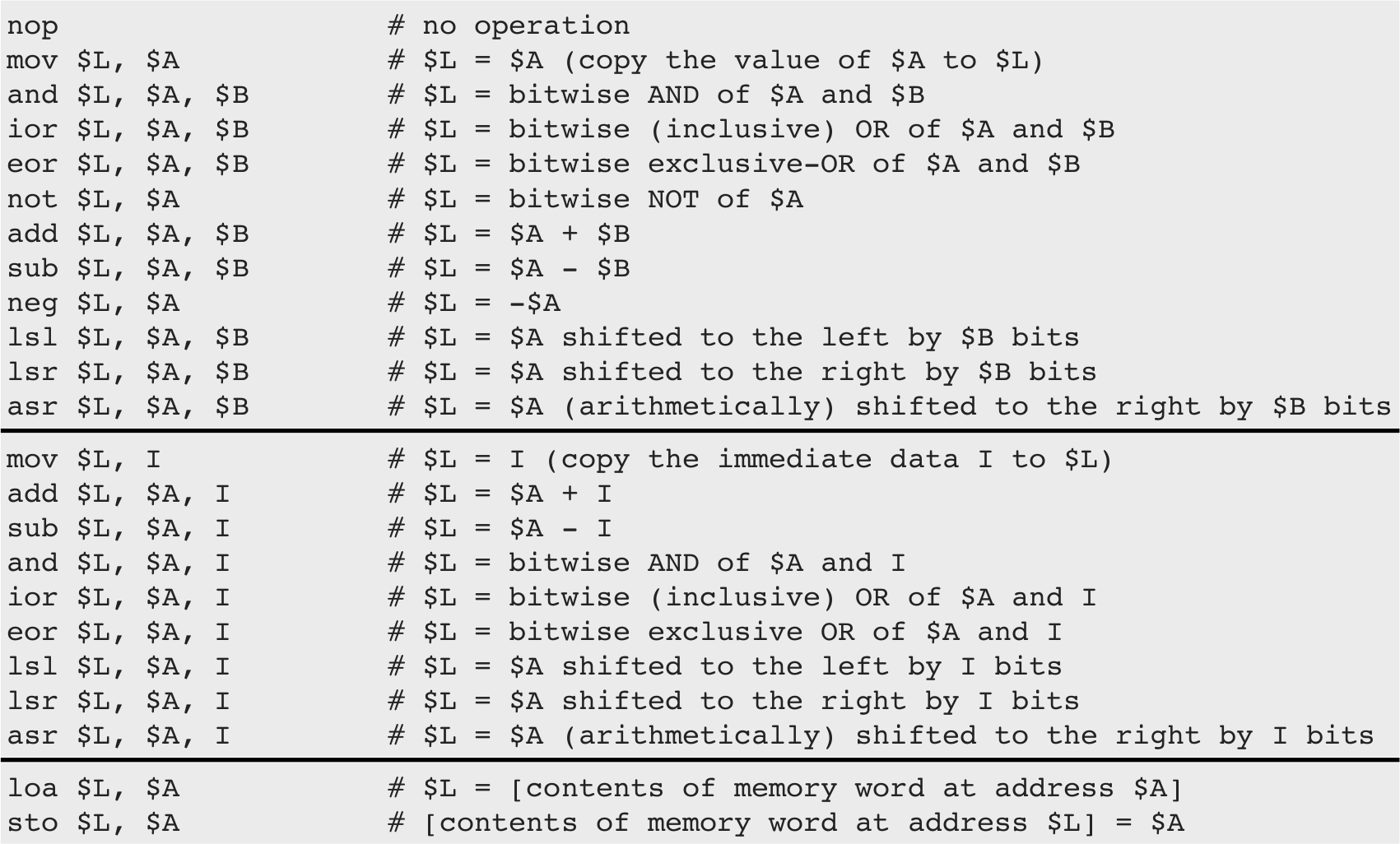
So, for example
mov $0, 10 # $0 = 10
mov $1, 1  # $1 = 1
mov moves a value to a register
add $1, $1, 1  # $1 = $1 + 1
sub $0, $0, 1  # $0 = $0 - 1
add and sub adds and subtracts, respectively.
mov $1, 7
add $2, $1, 3
What are the value of $1, and $2 after these instructions?
Jumping and branching
- Recall : Programs are data
- When the program is assembled it is translated into binary words (data)
- When a machine runs the program it is loaded into memory, like any other data
- Program Counter (PC) is set to the address of its first instruction, and execution begins by interpreting data at that location as an instruction
- By changing the PC we can change which instruction is read next
- PC is set using the jump and branch instructions
Jumping
- A jump moves the argument address to the program counter register
- The effect is that the program execution continues from the new address
- Not to have us deal with absolute addresses the assembler allows for labels in the code
- A label captures the address where it is written
@done:on a line will have the assembler associate that memory address with the label 'done'
- A label captures the address where it is written
   jmp >target    # jump to label @target

   # ... some code here ...

@target:
   # ... some further code here ...
(Note that you can jump both forwards and backwards in the code)
Jmp quiz
What is the value in $1 after this code is executed (starting from the top)?
mov $1, 18     # $1 = 18
add $1, $1, 2  # $1 = $1 + 2
jmp >next      # Jump
mov $2, 10     # $2 = 10
sub $1, $1, $2 # $1 = $1 - $2
@next:
sub $1, $1, 5  # $1 = $1 - 5
hlt            # Stop
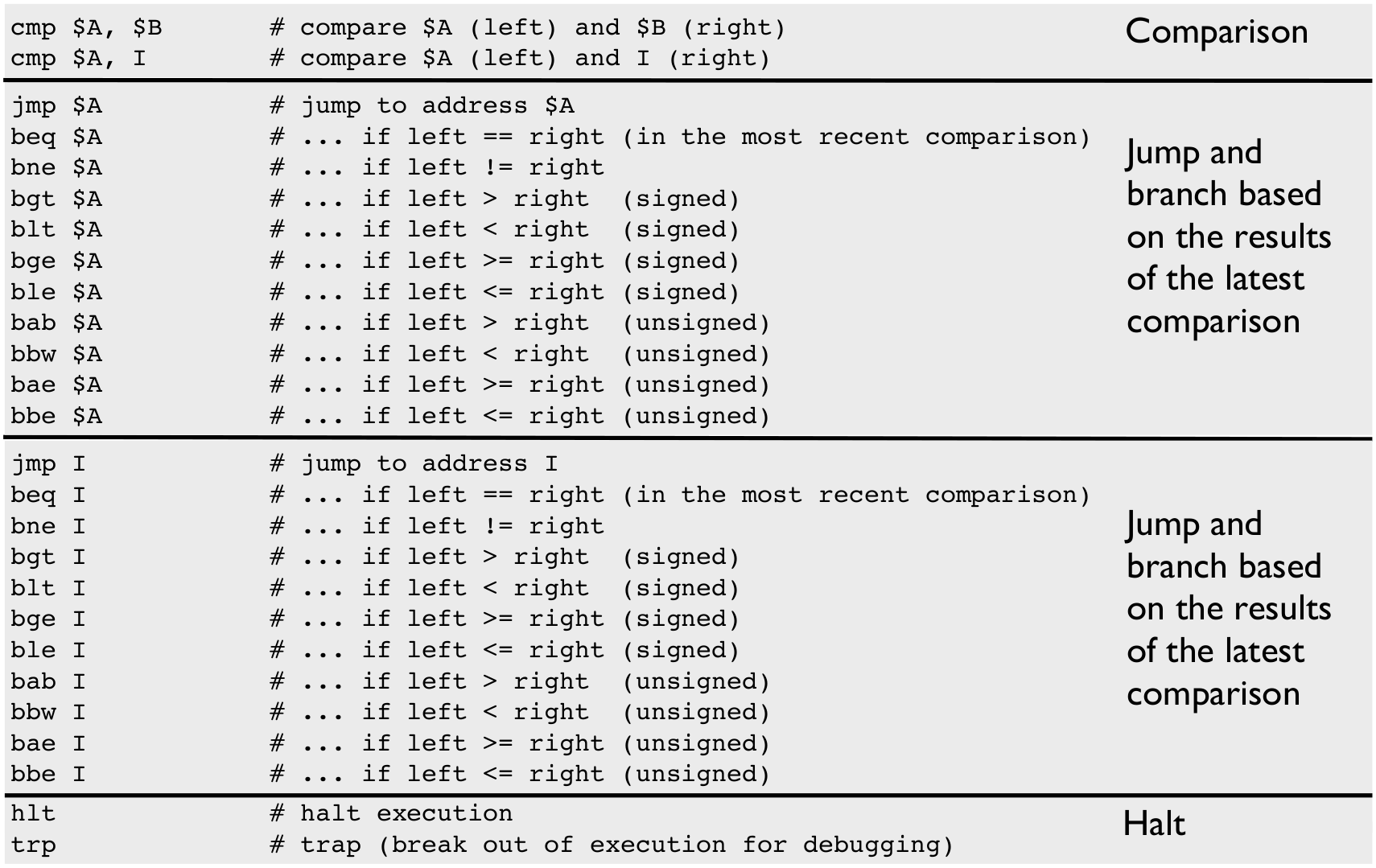
Comparison & branching
- Often we want to jump depending if some condition holds
- This is a two-step process
- Perform the comparison (register vs register or register vs constant)
- Jump depending on result of comparison (branching)
- The jump is executed if and only if the branching condition is true
- Otherwise the execution follows the default order
   # ... code
   # ... code
   # ... code
   # ... code
   cmp $0,0     # compare, this sets PS
   beq >done    # branch this sets PC
   # ... code - This will
   # ... code - only be
   # ... code - done
   # ... code - if $0 != 0
@done:
   # Start here if $0 == 0
        mov $0, 10      # $0 = 10
        mov $1, 1       # $1 = 1
        mov $2, 0       # $2 = 0
@loop:                  # This is a label
        cmp $0, 0       # $0 == 0 ? (PS)
        beq >done       # if PS is eq
        add $2, $2, $1  # $2 = $2 + $1
        add $1, $1, 1   # $1 = $1 + 1
        sub $0, $0, 1   # $0 = $0 - 1
        jmp >loop       # Jump back
@done:                  # Another label
        hlt             # Stop, sum in $2
if r7 != 0 then do <some code here> else do <and more code here>
(Think about: if does one or the other, branching can do a combination of them depending on other instructions.)
Comparison & branching – internally
cmpupdates the Processor Status register- That is PS holds the result of the most recent
cmpcall - Branching instructions reads PS and jumps accordingly
- Therefore there can be code in-between the
cmpand the branch instruction!
Branching quiz
What's the value in $0 after this code is executed (starting from the top)?
mov $0, 3      # $0 = 3
@start:
cmp $0, 2      # Compare val. in $0 to 2
sub $0, $0, 1  # $0 = $0 - 1
bne >start     # Branch if last cmp !=
hlt            # Stop
Instructions affecting execution flow
Loading and storing data
- Most algorithms will work on more data than can fit into CPU registers
- What is data?
- Bits that we want to be able to load into registers and perform operations on
- Need to load/store them from memory
loaandstocan be used to move words between memory and registers- (Think if it as
loa x,yisx = mem(y), andsto x,yismem(y) = x.)
- Note: Memory is used for both program and data
- The difference is how it is interpreted
- There are no separated memory areas (at least in our architecture)
- If PC contains a specific address, the word there will be interpreted as an instruction!
(In armlet PC always starts at 0, so data usually comes after program.)
Example: Updating a value in memory
This program loads a value from memory, increases it by 10, and writes it back to the same memory location:
mov $0, >myDataStart  # Put address of data to $0
loa $1, $0            # $1 = value at address in $0
add $1, $1, 10        # Increase value in $1 by 10
sto $0, $1            # Store the value in $1 to address in $0
hlt                   # Stop
@myDataStart:
%data 5, 6
(After executing the value at the address indicated by @myDataStart is 15, the next one is 6.)
Example: Addresses are values
- Addresses are values: we can index the memory by updating the address that we use for load and store.
This program loads a value from memory, increases it by 10, and writes it to the memory address two words further:
mov $0, >myDataStart  # Put address of data to $0
loa $1, $0            # $1 = value at address in $0
add $1, $1, 10        # Increase value in $1 by 10
add $0, $0, 1         # Update the address in $0 by 1
sto $0, $1            # Store the value in $1 to address in $0
hlt                   # Stop
@myDataStart:
%data 5, 6
(After executing the value at the address indicated by
@myDataStartis5, the next one is15.) The reason is the calladd $0, $0, 1which moves the address in$0one word forward.- Remember: How a value is interpreted is only determined by the instruction. There is no checking, so had we written
sto $1, $0instead we would have written the value in$0to address15(the content of$1)
Data: loa quiz
What are the values in $1, $2, and $3 after this code is executed (starting from the top)?
mov $0, >myDataStart  # Put address of data to $0
loa $1, $0            # $1 = value at address in $0
add $0, $0, 1         # Increase address
loa $2, $0            # $2 = value at address in $0
add $0, $0, 2         # Increase address
loa $3, $0            # $3 = value at address in $0
hlt
@myDataStart:
%data 5, 6, 7, 8, 9, 10
Example: Loading data from memory
# Computes (to $0) the sum of the data and then halts.

# Let us first set things up ...
      mov $0, 0                    # the sum starts with 0
      mov $2, >length_of_my_data   # set up memory address where to get length
      loa $2, $2                   # load the length from memory to $2
      mov $1, >my_data             # set up memory address where to get the data

# Now let us loop through the data and accumulate the sum ...
@sum_loop:
      cmp $2, 0                    # compare length with 0
      beq >done                    # ... branch to label @done if $2 == 0
      loa $3, $1                   # load a data item from memory
      add $0, $0, $3               # accumulate the sum in $0
      add $1, $1, 1                # advance to next data item
      sub $2, $2, 1                # decrement length by one
      jmp >sum_loop                # continue the summation

# ... until we are done
@done:
      hlt                          # the processor stops here

# Our data follows the program code in the binary ...
@length_of_my_data:
      %data 20
@my_data:
      %data 296, 573, 291, 415, 825, 674, 426, 632, 793, 701, 884, 1, 989, 912, 254, 869, 462, 296, 767, 220
(%data is a directive - an assembly helper tool; %data 20 will translate the literal 20 to binary and write it as data to memory)
More examples in the course notes
Check our code reading skills:
- What does the following program do?
- What are the contents of
$0,$1,$2when execution halts?
 mov $0, 18
 mov $1, 15
 cmp $0, $1
 blt >labA
 mov $2, $0
 jmp >labB
@labA:
 mov $2, $1
@labB:
 lsl $2, $2, 1
 hlt
| instruction | what it does |
|---|---|
blt X |
Jump to X if left < right (in prev. cmp) |
cmp $A, $B |
Compare A and B |
hlt |
Halt execution |
jmp X |
Jump (go to) X |
lsl $L, $A, $B |
L = A << B (left shift) |
mov $L, I |
L = A |
Comment your code!
Trying it out
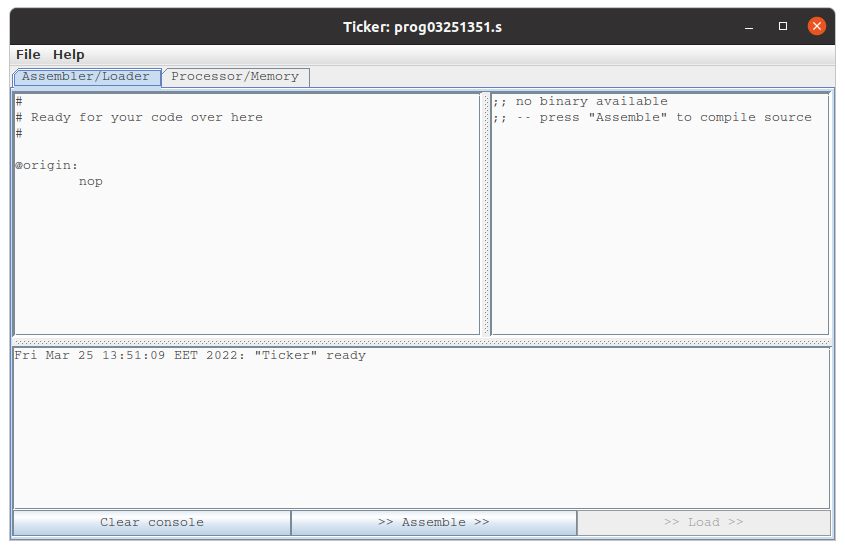
Run the program launchTicker.scala in the armlet sub-project.
Can we express more in Scala than in Assembly language?
- In principle no
- All 'high level' programs are translated to machine code
- In practice yes
- Abstractions, data types, programming constructs…
- You can be more productive in high level languages
So why learn to program assembly?
- 'Close to metal'
- Instructions directly to the hardware
- Unleash the most power of hardware
- The "mother language"
But, it is hard work as a programmer…
(Comment your code!)
The things we have omitted…
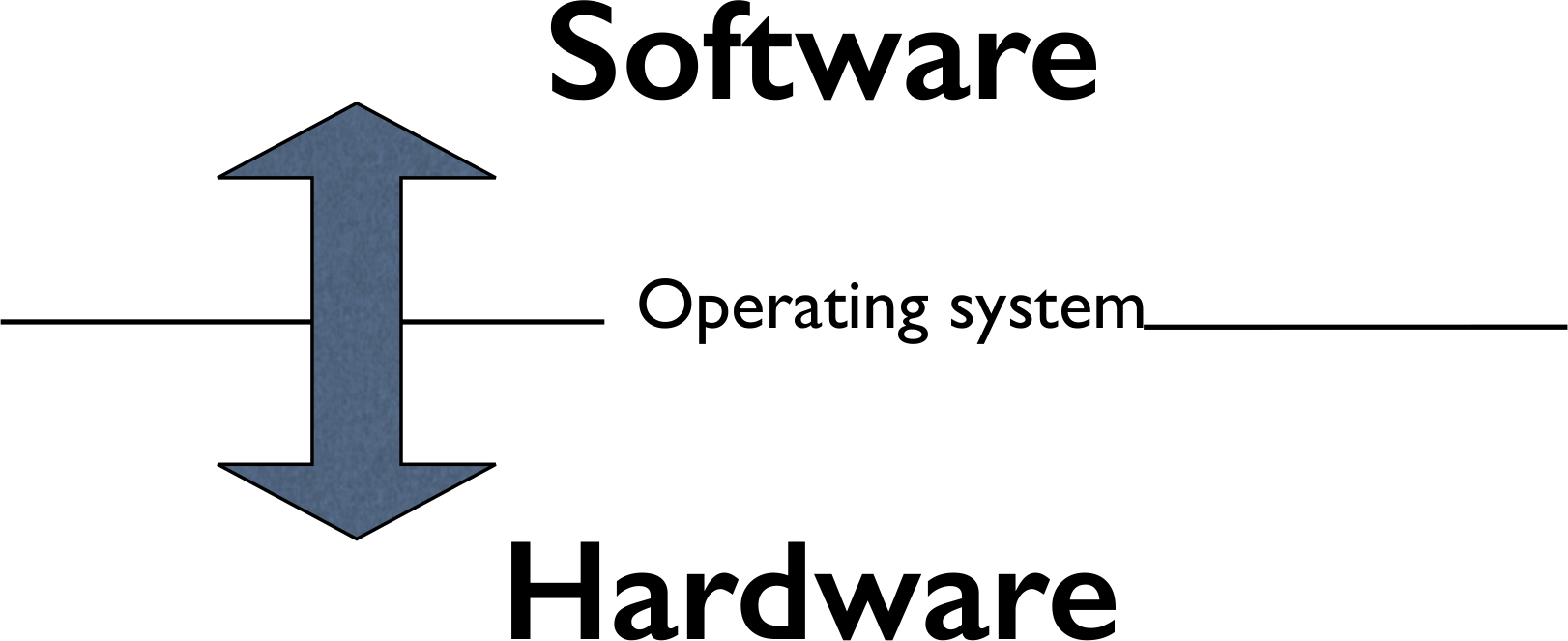
How can two program run simultaneously? How can a program wait for input? Print output? How are high level programs translated into machine code?
Summary
- In the end, everything is bits
- Combinational logic can be used to transform bits
- Sequential logic allows us to keep a state
- Computer Architecture allows us to engineer a machine
- A programmable machine executes a program automatically
- A program can change its control flow (branching) depending on state
- Programming languages (like Scala) are "only" software tools which helps us harness the hardware to do what we as programmers want
Exercises
- Evaluating an expression
- Word operations
- Range of values in a data array
- Most frequent value in a data array
- Multiplication
- Remainder computation
- Challenge problem: 32-bit remainder computation
- Challenge problem: Arithmetic mean
- Challenge problem: Greatest common divisor
Work through the notes examples first, these contain a lot of useful code!
- Comment your code
- For your own sake
- Assistants may not be able to help you before you do!
- There are only 8 registers ($0 – $7)
- Using $8 in Ticker will create an error (
failure: string matching...) - $8 will be converted to $7 in Blocksembler (pay attention!)
- Using $8 in Ticker will create an error (
- It may help to write an algorithm (or even a Scala program) first
- Use Ticker/Blocksembler to debug your code
- There are no unit tests this round
- But exercises come with examples in the comments